
Invites Guide: React Native
Configure Branch.io deep linking for StreamLayer invites in bare React Native projects. Covers native setup for Android and iOS, React Navigation routing, and the Branch event listener for handling invite links.
Invites Guide: React Native
This guide covers how to enable invite deep linking in bare React Native projects (without Expo) using Branch.io.
To enable invites for the React Native SDK, follow the Invites Guide for iOS or Android to configure the Branch SDK on each native platform, and refer to the Branch.io React Native integration guide for general setup.
Invites Integration
StreamLayer integrates Branch.io for invite deep linking. For a high-level overview of how invites work, see the Inviting Additional Users section in the StreamLayer Studio documentation.
- Create a new account on Branch.io or use your existing account.
- Link your Branch.io credentials with your StreamLayer account in StreamLayer Studio.
- Install Branch.io on the client side and add the Branch.io keys to your project configuration. You can find your Branch key in your Branch Dashboard.
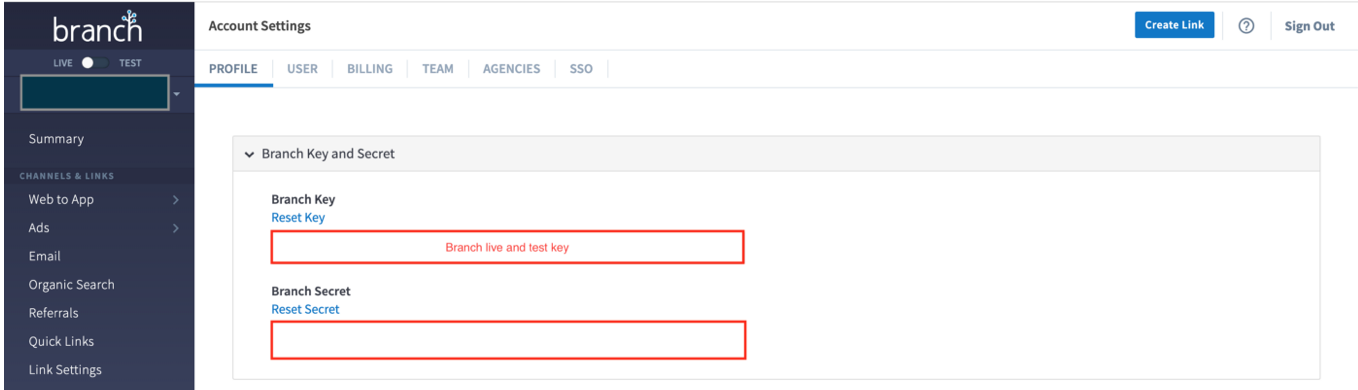
Install Branch SDK
Android Setup
MainActivity.kt
MainActivity.ktIn the onCreate() method, force a new Branch session on every new intent:
import io.branch.rnbranch.*

class MainActivity : ReactActivity() {
    override fun onCreate(savedInstanceState: Bundle?) {
        setTheme(R.style.AppTheme)

        // Force a new Branch session on every new intent
        val intent = intent
        intent.putExtra("branch_force_new_session", true)
        setIntent(intent)

        super.onCreate(savedInstanceState)
    }

    override fun onStart() {
        super.onStart()

        // Initialize the Branch session with intent data
        RNBranchModule.initSession(intent.data, this)
    }

    override fun onNewIntent(intent: Intent) {
        super.onNewIntent(intent)
        setIntent(intent)

        // Reinitialize the Branch session when a new intent is received
        RNBranchModule.reInitSession(this)

        // Optional: Handle deep linking with other modules if required (e.g., StreamLayer)
        StreamLayer.handleDeepLink(intent, this)
    }
}
MainApplication.kt
MainApplication.ktInitialize the Branch SDK in the onCreate() method:
import io.branch.rnbranch.*

class MainApplication : Application(), ReactApplication {

  override fun onCreate() {
    super.onCreate()

    // Initialize Branch SDK
    RNBranchModule.getAutoInstance(this)

    // Enable Branch SDK logging for debugging
    RNBranchModule.enableLogging()

    ApplicationLifecycleDispatcher.onApplicationCreate(this)
  }
}
iOS Setup
AppDelegate.swift
AppDelegate.swift- Import the Branch module:
import RNBranch- Initialize Branch in
didFinishLaunchingWithOptions:
Swift:
func application(_ application: UIApplication, didFinishLaunchingWithOptions launchOptions: [UIApplicationLaunchOptionsKey: Any]?) -> Bool {
  RNBranch.initSession(launchOptions: launchOptions)
  return true
}
Objective-C:
- (BOOL)application:(UIApplication *)application didFinishLaunchingWithOptions:(NSDictionary *)launchOptions
{
  self.moduleName = @"example";
  // You can add your custom initial props in the dictionary below.
  // They will be passed down to the ViewController used by React Native.
  self.initialProps = @{};

  [RNBranch initSessionWithLaunchOptions:launchOptions isReferrable:YES];

  self.sdk = [[SLRObjCWrapper alloc] init];
  [self.sdk setupSDK];

  return [super application:application didFinishLaunchingWithOptions:launchOptions];
}
- Implement the
openURL()method:
func application(_ app: UIApplication, open url: URL, options: [UIApplicationOpenURLOptionsKey: Any] = [:]) -> Bool {
  RNBranch.application(app, open:url, options:options)
  return true
}- Implement the
continueUserActivity()method:
func application(_ application: UIApplication, continue userActivity: NSUserActivity, restorationHandler: @escaping ([Any]?) -> Void) -> Bool {
  RNBranch.continue(userActivity)
  return true
}
React Native Configuration for Branch
Create branch-config.js
branch-config.jsIn the root of your project, create a file named branch-config.js with the following content:
export default {
   apiKey: 'key_live_hnN8KTW5btUZkBFhsP8QIhbdExmquc8K',
};
Add Branch Event Listener
import branch from 'react-native-branch';

branch.subscribe(({ error, params, uri }) => {
  if (error) {
    console.error('Error from Branch: ' + error);
    return;
  }

  if (params['+clicked_branch_link']) {
    if (Platform.OS === 'ios') {
      StreamLayer.getInvite({ streamlayer: params.streamlayer });
    } else if (Platform.OS === 'android') {
      const sendInvite = async () => {
        const invite = await StreamLayer.getInvite(params.streamlayer);
        setTimeout(() => {
          if (params.streamlayer !== undefined) {
            viewRef.current?.handleInvite(params.streamlayer);
          }
        }, 1000);
      };
      sendInvite();
    }
  }
});
Below is an example of handling universal links and routing to the correct screen with StreamLayer invite handling using React Navigation:
import React, { useEffect } from 'react';
import { SafeAreaProvider } from 'react-native-safe-area-context';
import { NavigationContainer } from '@react-navigation/native';
import { createBottomTabNavigator } from '@react-navigation/bottom-tabs';
import { createNativeStackNavigator } from '@react-navigation/native-stack';
import { createNavigationContainerRef } from '@react-navigation/native';

import FeedScreen from './screens/FeedScreen';
import LiveScreen from './screens/LiveScreen';
import PlayerScreen from './screens/PlayerScreen';
import ProfileScreen from './screens/ProfileScreen';
import SettingsScreen from './screens/SettingsScreen';

import branch, { BranchParams } from 'react-native-branch';
import { StreamLayer } from 'rreact-native-sl-sdk';

const Tab = createBottomTabNavigator();

const Stack = createNativeStackNavigator();

function HomeTabs() {
  return (
    <Tab.Navigator>
      <Tab.Screen name="Feed" component={FeedScreen} />
      <Tab.Screen name="Live" component={LiveScreen} />
      <Tab.Screen name="Profile" component={ProfileScreen} />
      <Tab.Screen name="Settings" component={SettingsScreen} />
    </Tab.Navigator>
  );
}

function App(): React.JSX.Element {

  const navigationRef = createNavigationContainerRef()

  useEffect(() => {
    const subscription = branch.subscribe({
      onOpenStart: ({ uri, cachedInitialEvent }) => {
        // cachedInitialEvent is true if the event was received by the
        // native layer before JS loaded.
        console.log(
          'Branch subscribe onOpenStart, will open ' +
          uri +
          ' cachedInitialEvent is ' +
          cachedInitialEvent,
        );
      },
      onOpenComplete: ({ error, params, uri }) => {
        if (error) {
          console.error(
            'Branch subscribe onOpenComplete, Error from opening uri: ' +
            uri +
            ' error: ' +
            error,
          );
          return;
        }
        if (params !== undefined) {
          processBranchLink(params)
        }
      },
    });
    return () => subscription();
  });

  const processBranchLink = async (params: BranchParams) => {
    try {
      const invite = await StreamLayer.getInvite(params);
      console.log(`Invite: ${JSON.stringify(invite)}`)
      if (invite !== undefined && invite !== null) {
        checkAuth(() => {
          if (navigationRef.isReady()) {
            navigationRef.navigate('Player', { hocMode: false, invite: invite });
          }
        })
      }
    } catch (e) {
      console.error(`Error: ${JSON.stringify(e)}`);
    }
  };

  const checkAuth = async (block: () => void) => {
    try {
      const isUserAuthorized = await StreamLayer.isUserAuthorized()
      if (!isUserAuthorized) {
        await StreamLayer.useAnonymousAuth();
      }
      block()
    } catch (e) {
      console.error(e);
    }
  };

  return (
    <SafeAreaProvider>
      <NavigationContainer ref={navigationRef}>
        <Stack.Navigator>
          <Stack.Screen name="Home" component={HomeTabs} options={{ headerShown: false }} />
          <Stack.Screen name="Player" component={PlayerScreen} options={{ headerShown: false }} />
        </Stack.Navigator>
      </NavigationContainer>
    </SafeAreaProvider>
  );
}

export default App;
Related
- Invites Guide: Expo — Branch.io setup for Expo projects
- Invites Guide (iOS) — Native iOS Branch.io configuration
- Invites Guide (Android) — Native Android Branch.io configuration
- Inviting Additional Users — StreamLayer Studio invite configuration
Updated 7 months ago