
Introduction
StreamLayer transforms video streaming into interactive, advertising-driven experiences. SDK overview for iOS, Android, React Native, Web, tvOS, and Connected TV.

StreamLayer is an SDK and platform that transforms traditional video streaming into an interactive, advertising-driven experience. Designed for CTV, mobile, and web, StreamLayer enables media companies and sports broadcasters to increase engagement, generate new revenue streams, and personalize viewer experiences—without disrupting core video content.
This page provides a high-level overview of StreamLayer, its capabilities, and how its core pieces work together.
First, connect your AI coding assistant
Give your assistant access to the StreamLayer docs before starting an SDK integration. It can search the guides and read the right platform integration skill while working in your app.
Connect your AI coding assistant — Setup for Cursor, Codex, Claude Code, GitHub Copilot in VS Code, and other MCP-compatible tools. Then follow Integrate with an AI Agent or choose your SDK platform below.
What StreamLayer Delivers
-
Interactive Advertising
Enable rich, nonlinear ad formats — such as StreamLayer Elements, L-bars, or notifications — triggered by real-time game events, VAST tags, SIMID, or SCTE-35 cues. Ads support interactive brand messaging and calls to action. -
Pause Advertising
Show interactive ad units when viewers pause content. Follow the Pause Ads overview and your platform guide for the supported trigger and playback behavior. -
Engaging Viewer Features
Offer fans live stats, predictions, polls, social highlights, and messaging — all perfectly synced with the video timeline. -
Seamless Integration
Follow your platform's player integration requirements. The StreamLayer Element adapts to multiple formats — overlay, sidebar, L-bar, portrait — fitting your app's layout. -
Multi-Platform Integration
Choose the CTV, mobile, or web SDK for your app. Supported layouts and player callbacks are documented in each platform guide. -
Contextual Intelligence
Use key moments in a game (e.g., touchdowns, stat milestones, tweets, betting odds) to trigger content and ads at the right time.
⚡ What It Looks Like in ActionWhen the game changes, so does your experience.
A player scores 30 points.
A Sponsored Stat notification appears.
The viewer taps.
A branded, interactive 2:1 StreamLayer Element opens instantly—contextual and in-stream.
The Three Core Components
1. StreamLayer SDK
The SDK embeds interactive features and advertising directly in your app. Versions are available for:
- tvOS
- Android TV / Google TV
- Web SDK for TV platforms
- Roku
- iOS
- Android
- React Native (including Expo)
- Web
Supported formats include:
- Squeeze-Back Format – Video shrinks to display the StreamLayer Element alongside the player.
- Overlay Format – The StreamLayer Element appears over the video.
- Portrait Format – The StreamLayer Element displays below the video.
All SDKs support real-time updates and dynamic reconfiguration from the backend.
2. StreamLayer Studio
StreamLayer Studio is a content management system for producers, moderators, and digital teams. You can:
- Post ads, stats, polls, trivia, predictions, tweets, and insights
- Trigger or schedule nonlinear moment-based promotions
- Manage branding, themes, and formats
- Moderate live chat and games
- Track engagement analytics and feature performance
Learn more → About StreamLayer Studio
3. Backend + Trigger Engine
Our backend handles:
- Real-time event detection (game stats/key moments, VAST, SCTE-35, SIMID, elapsed time).
- Conflict avoidance – multiple events activated in a short period.
- Queuing for delayed viewing.
- Payload generation for units and ad units.
- Configuration syncing across all SDK clients.
- Analytics event processing and tracking.
Supported trigger sources include:
- Event Triggers – Key game or match moments from providers such as Sportradar, Stats Perform, Opta, Genius, or league feeds.
- SIMID – Secure Interactive Media Interface Definition.
- VAST 4.x – From ad servers such as Google Ad Manager.
- SCTE-35 – Linear broadcast cue tones.
- Manual – From Studio or backend.
- World Clock Triggers – Activate at a specific time.
- Elapsed Time Triggers – Activate at a preset time delay from the previous unit.
- Custom Webhooks
Feature & Ad Ecosystem
| Feature | Description |
|---|---|
| Nonlinear Moment-Based Ads | A full suite of dynamic nonlinear ad units triggered by live events, including: |
| • Standard Ad (1:1, 2:1, 1:2) | Side Bar, L-Bar, or StreamLayer Element with video/image with CTA button |
| • Insight Ad | Side Bar, L-Bar, or StreamLayer Element with player, team, or match stats |
| • Prediction Ad | Side Bar, L-Bar, or StreamLayer Element with player and game/race predictions |
| • Trivia Ad | Side Bar, L-Bar, or StreamLayer Element with trivia questions + answers with context |
| • Poll Ad | Side Bar, L-Bar, or StreamLayer Element gauging fan sentiment |
| • Shoppable Ad | Side Bar, L-Bar, or StreamLayer Element with product views and commerce functionality |
| • Picture-in-Picture Ads | Game video set next to advertisement video, with branded background |
| • Frame Ads | Branded container that wraps around the video |
| • Video Banner Ads (7:1) | Wide branded video strip displayed over video on the bottom or top of the screen |
| • Sponsored Stats | Branded fact or stat shown during key moments in the stream. |
| • Live Moment Notifications | Branded notification connecting live game context to the sponsor's ad unit |
| Pause Ads | Interactive brand ads displayed when viewers pause content. Available on CTV, mobile, tablet, and web. Configurable delay from instant (pre-fetched) to any custom duration. Supports CTAs, shopping, QR codes, and device handoff. |
| Stats & Insights | Push key stats, fast facts, or highlight moments |
| Feature Sponsorship | Attach brands to polls, trivia, stats, or notifications |
| Live Odds & Micro-Wagering | Display sportsbook odds and offer betslip handoff |
| Free-to-Play Games | Trivia, polls, and prediction contests with real-time scoring |
| Public & Private Chat | Integrated messaging during live streams |
| X/Twitter Integration | Surface high-impact social comments inline during the event |
| In-App Notifications | Trigger branded or contextual alerts during gameplay |
| User Profiles | Viewer identity, contact syncing, and presence awareness |
StreamLayer Architecture at a Glance
- Singleton SDK Instance: One instance per app, linked to a public API key.
- Real-Time Triggers: The backend sends triggers, and the SDK renders units instantly.
- On-Demand Reconfiguration: Update features, ads, and layout in real time.
- Secure User Syncing: Enables contact invites and messaging.
- Analytics: Tracks impressions, clicks, dismissals, and feature engagement.
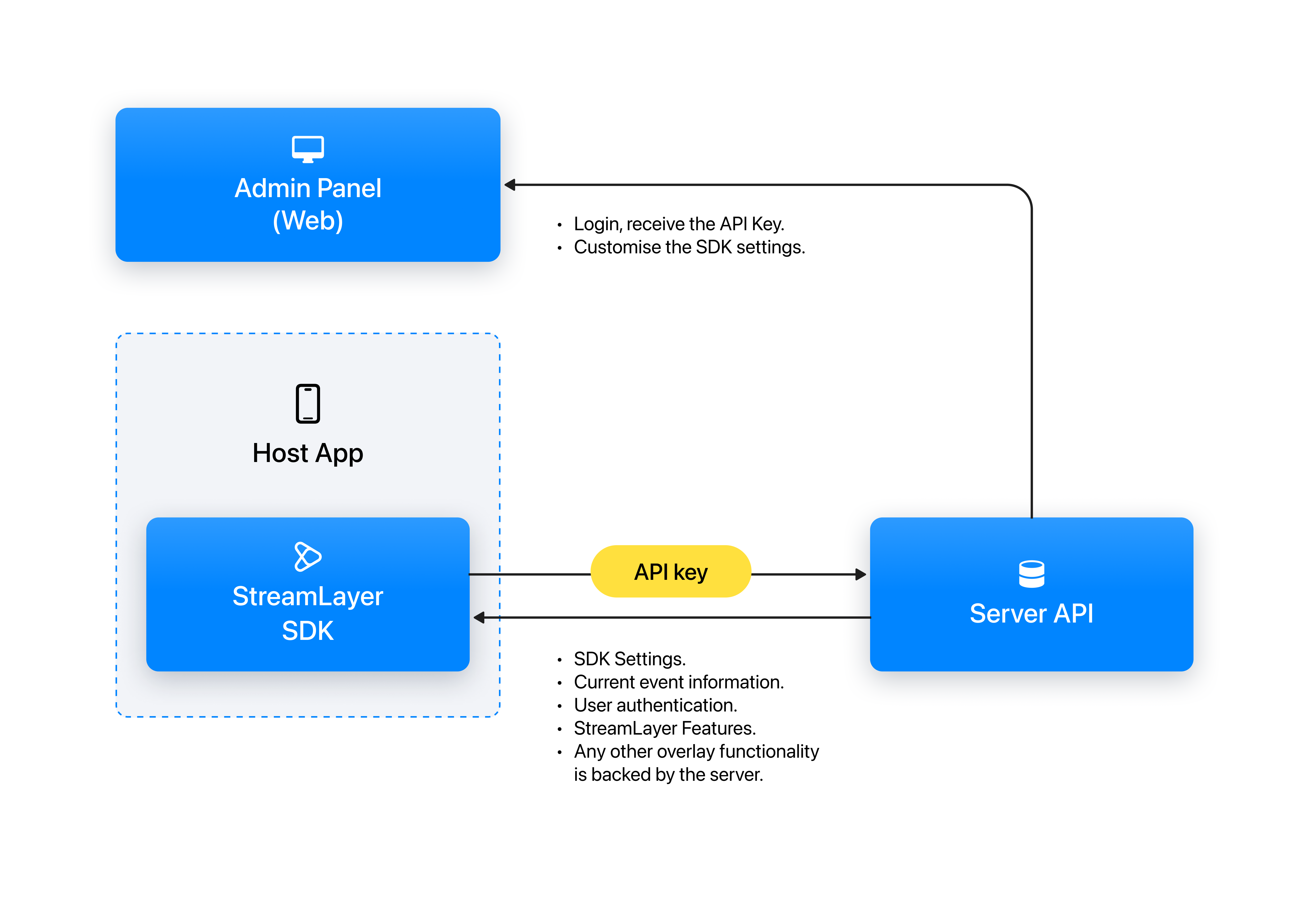
Authentication Flow
Some features require lightweight authentication for personalization and social interaction.
- Phone number or email verification
- Contact syncing (for invites)
- Viewer-controlled preferences
- Optional user profile with avatar and name
Before You Start
To integrate the StreamLayer SDK, you'll need:
- An SDK API Key from your StreamLayer account manager or from StreamLayer Studio.
- Access to StreamLayer Studio for configuring events, ad units, and interactive features.
- A decision on which features your app will use (advertising, gamification, stats, etc.).
- If you are doing key moments, a live data API that StreamLayer can integrate and map to your org.
Next Steps
Choose your platform to get started:
| Platform | Getting Started Guide |
|---|---|
| tvOS | tvOS → Getting Started |
| Android TV / Google TV | Android TV → Getting Started |
| Samsung Tizen | Tizen TV → Getting Started |
| LG WebOS | WebOS → Getting Started |
| Xbox | Xbox → Getting Started |
| Roku | Roku SDK → Getting Started |
| Hisense VIDAA | VIDAA → Getting Started |
| iOS | iOS SDK → Getting Started |
| Android | Android SDK → Getting Started |
| React Native | React Native SDK → Getting Started |
| Web | Web SDK → Getting Started |
Or explore by role:
- Content & Ad Operations → StreamLayer Studio Overview
- View Formats → Formats Reference
Updated about 1 month ago