
Launch Button and Submenu
StreamLayer's Launch Button provides quick access to all interactive features through a floating, expandable submenu that adapts to landscape and portrait layouts.
Note: This feature is available on mobile (iOS, Android, React Native) and web. On CTV platforms, enable a second-screen setup so viewers can participate from their phone while watching on TV.
StreamLayer's features are accessed through a floating Launch Button positioned in the lower-right corner of the screen. The button is designed to be unobtrusive—viewers who want to watch without interacting simply ignore it, and the screen looks virtually identical to how it would without StreamLayer.
On first visit, an animated tooltip informs viewers that interactive features are available. Tapping the button reveals the submenu, which provides access to all StreamLayer features. When a submenu item is selected, the StreamLayer Element opens with content tied to the primary video being streamed. For example, selecting Live Stats while watching an NFL game between the Bears and Cowboys shows stats for that specific matchup.
Layout Behavior
- Landscape mode — The Launch Button appears in the lower-right corner. The submenu expands vertically.
- Portrait mode — The Launch Button appears in the lower-right corner. The submenu expands horizontally across the bottom of the screen.
The host app can reposition the button anywhere within the app by specifying the location in the SDK configuration.
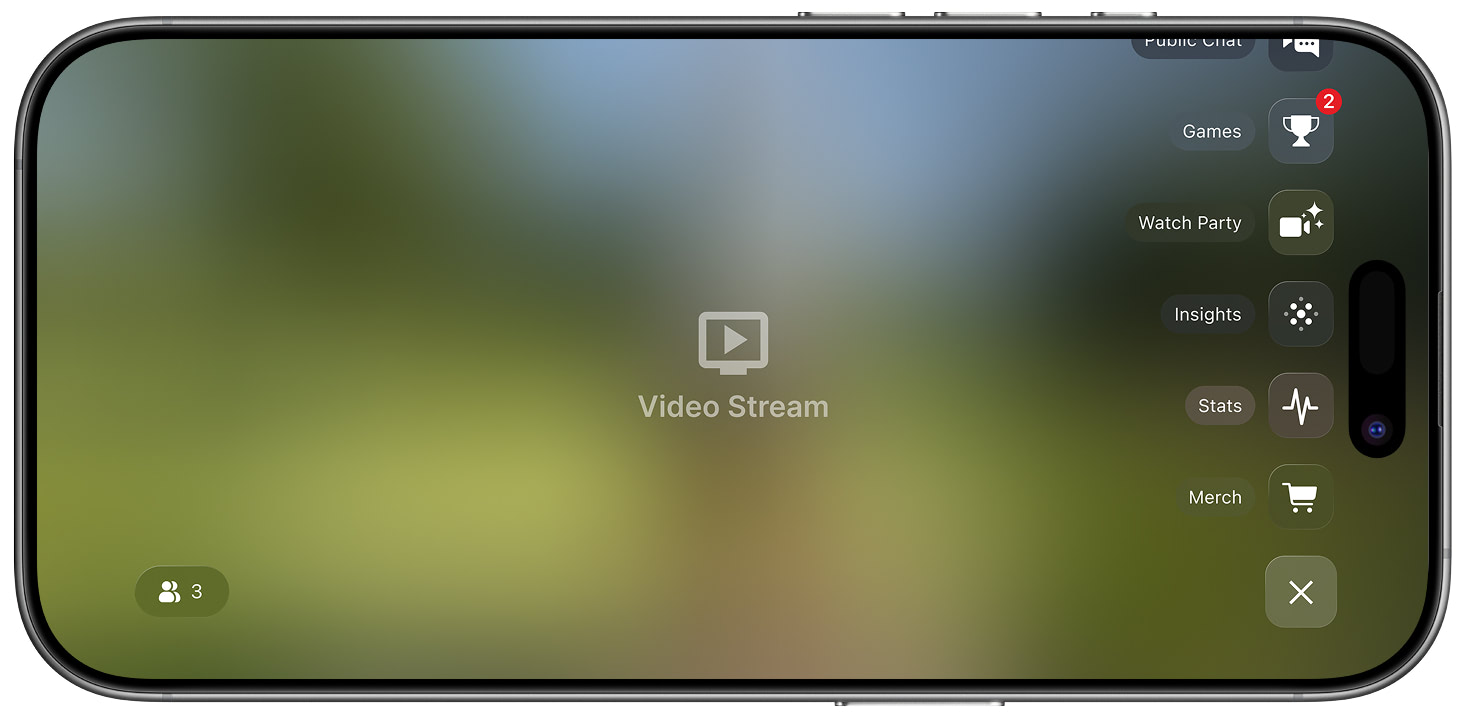
Exposed Menu
Submenu Options

The submenu includes access to:
- Merchandise
- Live Stats
- Live Odds
- Insights / Video Highlights
- Interactive Game (Polls, Trivia, Predictions)
- Public / Private Chat
- Social (X Posts)
- Tickets
- Profile
Related
- Feature Overview — All interactive features and ad units
- User Profile — Viewer identity and notification preferences
Updated 7 months ago